Our Products
Designed for little hands, powered by big ideas.
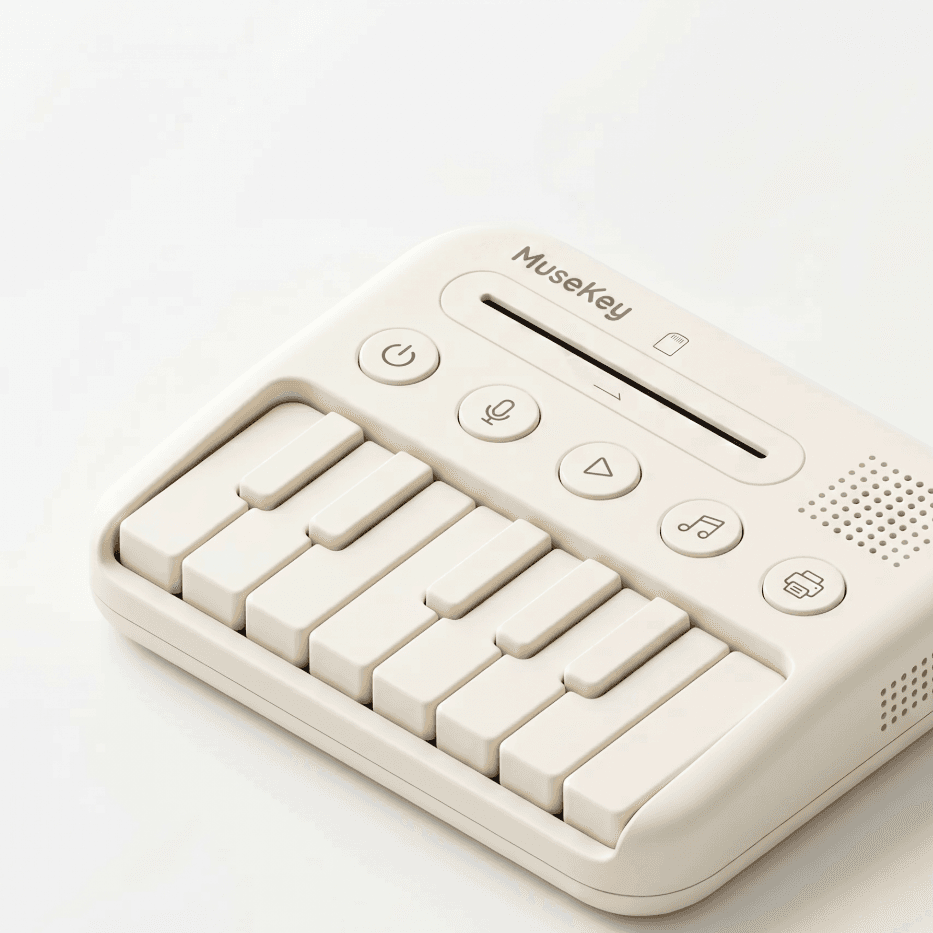
MuseKey Smart Keyboard
A 25-key smart keyboard with RGB backlight, touch-sensitive keys, and built-in AI music creation. Bluetooth 5.0 connects seamlessly to the MuseKey app.
- 25 touch-sensitive keys with RGB light guidance
- AI-powered music creation: humming, blocks, sampling
- Built-in speaker and 3.5mm headphone jack
- Bluetooth 5.0 for app connectivity
- Rechargeable battery (8-hour playtime)
- Parental app with progress tracking and song library
Technical Specifications
Perfect for Every Moment
At Home
After school, before bed — anytime is music time. Kids explore, create, and share songs with family.
In the Classroom
Teachers use MuseKey to make music lessons interactive. Blocks mode helps children learn vocabulary through song.
On the Go
Compact and portable with 8-hour battery life. Perfect for road trips, flights, and visits to grandma's.
How MuseKey Works
From a duck quack to a complete song — in five simple steps.
Capture a Sound
Your child records a sound — a duck quack, a drumbeat, a giggle.
Name & Identify
"What's that sound?" — "It's a little duck's song!" Voice-guided interaction keeps it intuitive.
AI Creates the Song
AI expands the sound into a melody with lyrics and full accompaniment.
Save to Work Card
The song is saved to an NFC card. Your child draws, stickers, and names their masterpiece.
Share with Others
Tap the card on another MuseKey to share — friends and family hear the song instantly.
The Creative Work Card
More than a song file — it's your child's first creative portfolio. Each NFC card becomes a unique, shareable artwork.
- NFC tap-to-play — no screen, no app needed
- Children draw, sticker, and name their own cards
- Collectible and shareable with friends and family
- Build a growing library of original creations
NFC Work Card
Tap. Play. Share.